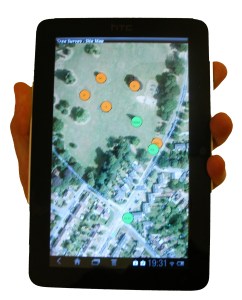
OTISS can greatly assist Arboricultural Consultants when carrying out general Tree Safety surveys, Tree Risk Assessment, Tree Valuation or TPO assessment.
On-site data collection and photos using the Tree Survey app on your Android phone, tablet or GPS device.
Web based tools for further update, sharing and collaboration.
Formatted PDF and Excel charts and tables to include to your report.
Colour coded maps.
Tree Safety Surveys
An OTISS ‘survey‘ is created to plan and carry out an inspection cycle on a client’s estate. This ‘survey‘ record contains general information about aims, restrictions, weather on the day, overall findings, etc. Within a ‘survey’, an ‘inspection‘ record is created for each tree; see the full listing of tree survey data stored by OTISS for each tree.
Inspections are carried out using your phone, tablet or GPS device. With the Tree Survey Android application, you can view, update and create new tree inspections. The maps, photos and data are synchronised between OTISS and your phone.
If you are already using specialised mobile survey devices for collecting data, then we may be able to import/export maps and data to these devices. Please let us know what survey equipment you already have.
All new tree inspections are linked to a current active/open survey. When this survey is set to the ‘closed’ state. then these inspections are ‘frozen’ and an audit trail is created. A new OTISS ‘survey’ can then created for the next inspection cycle.
Risk Assessment
OTISS now supports various tree safety risk assessment methodologies (e.g. ISA TRAQ, QTRA, THREATS, Matheny and Clark). As part of each tree inspection, you fill in the risk factors that are used to automatically calculate a resulting risk category. OTISS supports many standard methodologies, and we provide two configurable algorithms to setup your own method. Read more…
Tree Valuation
As an optional extra, you could also carry out a CAVAT valuation on the trees. The tree valuation sub-forms are simply part of a TreeSafety or Risk Assessment survey; or can be used to carry out tree stock valuation on an estate. As you fill in the valuation factors, the forms automatically calculate a resulting monetary value (£) or merit score. Read more…
Tree Preservation Order
As an optional extra, you can carry out a TEMPO evaluation on the trees. As you fill in the required factors, the form automatically calculates a TPO merit score. Read more…
Veteran Tree Survey
Within the TreeSafety module, there are two templates to enable you to carry out Veteran Tree surveys. Read More…
Inventory of Trees
The inventory that was build up during the surveys can be viewed and updated from any Web browser.
The trees can be divided into separate sites. Site details (access, contact, key holders, etc.) can be setup for each site.
Part of each tree inspection will be recommendations for maintenance or for the need for more detailed investigation (e.g. internal decay detection). These can be followed up with records of when the work was actually carried out.
The Tree Safety spreadsheet page allows you to search and sort your data using multiple criteria. For example:
“show me all trees on a particular site that need work doing on them”,
“list all the oak trees and order them by age class”.
OTISS provides a set of several hundred Common Tree Species. The list also includes entries for the genus (e.g. Willow sp.) for when species level identification is not required. For each estate, you can build your own list of Estate Tree Species.
If you have existing spreadsheets, databases, KMLs or shapefiles with relevant tree or inspection data, we may be able to load these into OTISS. Please contact us for more information on what can be done.
Photos and Documents
The mobile survey apps are used to take photos of the trees and their defects. These are sync’ed to the website, where the Photo Gallery is used to view, update and export the photos. More photos can also be uploaded directly onto the OTISS website. Read more…
In addition, PDFs, Word, Excel and other document types can be stored with each tree. For example, old survey documents, internal decay analysis (e.g. from Tree Diagnostics), tree vitality reports (e.g. from Arborcheck), etc.
Maps
The trees can also be displayed using online maps and coloured icons.
Upload your own site plans, architects plans, CAD DWG drawing, Ordnance Survey maps, OS Mastermap, topography plans, geo-referenced maps or aerial photos.
The standard pan and zoom features allow you to move around the map.
Clicking on an icon allows you to view or update the tree’s details.
The web map view and the Tree Survey Android app both provide very easy ways of adding new trees. Simply click on the map and enter the information you have available.
Group of trees and hedges are shown as polygons, and can be reshaped as required. Trees can be re-positioned by simply dragging them to a new location.
Works with the GPS device in your phone/tablet, or with external GPS/GNSS receivers with sub-metre accuracy.
Configure the icon colours by selecting which survey data field to use, and map the survey values to your choice of colours. For example: a simple Red/Orange/Green system for Condition, RiskCategory, WorkDue, etc.; or something more complex – you decide!
Create PDF maps and site plans – for example Tree Survey Map.
CAD/DXF drawings
The trees can be plotted onto a CAD drawing and exported as a DXF file. The DXF file is intended to be opened by your own CAD application and merged with your existing maps or site plans. More information on the Tree Survey CAD/DXF drawings.
Creating Reports
OTISS does not force you to use a particular report format. Instead we provide a set of customisable charts and data tables (PDF and Excel), maps and CAD; for you to encorporate into reports and work schedules.
OTISS provides a range of pre-defined Excel spreadsheets to provide summary charts and detailed information about the surveyed trees. In addition, you can customise your own Excel Report Templates (styles, columns, charts, etc) and OTISS will fill in the data and photos. These provide ready-to-use charts and data tables to be copied to your final report.
You can create a set of Excel Report Templates to layout your company style, fonts, colours, column widths, border, formatting, etc. Select which data columns to include and the summary tables to provide some key statistics: e.g. condition, species, etc. Upload your prepared template to OTISS and the spreadsheet is immediately returned to you with the requested data and photos. Copy the charts and tables into your final report. More about Excel Report Templates...
This approach gives you complete control to provide overview, summary and explanations in the final report, and let OTISS provide the bulk of the charts and details.
The following pre-defined PDF reports present examples of what you could achieve.
Tree Survey Map provides a map/plan of – with logo, legend and notes.
The audit trail, photos and history of each tree can be viewed. This provides a complete audit trail of all the inspections (including dates, surveyor’s name, etc.) and all management work carried out on the tree.
When all the data has been collected from the surveys, it can be used to plan the work programme.
OTISS provides pre-defined PDF reports and Excel spreadsheets to list the survey recommendations. In addition, you can set up your own Excel Report Templates (styles, columns, charts, etc) and OTISS will fill in the data. More about Excel Report Templates...
The spreadsheet page allows you to search and sort your data using multiple criteria. For example:
“show those trees on a particular site that need work doing on them this year”,
“show all trees that are due for inspection within the next 6 months”,
The map page allows you colour the icons according to ‘WorkDue’: i.e. overdue, within 1 year, after 1 year. This provides an at-a-glance summary for managers, and a useful map for the contractors.
If required, specialised data processing can be carried out by downloading the raw data into an Excel spreadsheet.
Once you carry out the recommended works, you use the set of Work Done fields to record the date the work was done, by whom and some work notes. These could be filled in by the work team or by a followup visit to check the work. These work dates and notes allow for a complete record and audit trail of all survey and subsequent maintenance work on each tree.