
Asset inventories and maps are a fundamental part of effective Estate Management. OTISS maintains an inventory of field assets and tree stock which can be viewed on maps, spreadsheets and reports.
Photos and Documents
- It is normal practice to start a management programme with a comprehensive baseline survey. As part of a this survey you would identify and plot all field assets, park or street furniture on your property(s) and the locations of all high risk trees. OTISS maintains a geographic information system (GIS) based database of your assets.
- OTISS stores details on location, species, size, description, condition and all the other information you need for tree and asset management. Many of the fields can be customised to suit the estate’s requirements.
- Take photos as you survey. Good photos reduce the need for detailed descriptions, and speed up the survey process.
- If you have existing spreadsheets, databases, KMLs or shapefiles with relevant tree and asset data, we may be able to load these into OTISS. Please contact us for more information on what can be done.

The mobile survey apps are used to take photos of the item/trees and their defects. These are sync’ed to the website, where the Photo Gallery is used to view, update and export the photos. More photos can also be uploaded directly onto the OTISS website. Read more…
In addition, PDFs, Word, Excel and other document types can be stored with each tree. For example, old survey documents, internal decay analysis (e.g. from Tree Diagnostics), tree vitality reports (e.g. from Arborcheck), etc.
Maps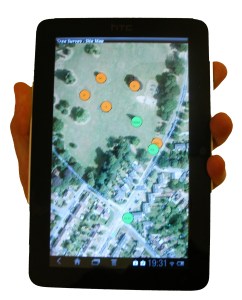
The tree stock and furniture items can be displayed using online maps (e.g. Open Street Map, Google) or your own estate maps.
- Upload your own estate maps, site plans, Ordnance Survey maps, OS Mastermap, geo-referenced maps, CAD drawings or aerial photos. Plot directly onto these plans using the mobile survey apps.
- The standard pan and zoom features allow you to move around the map.
- Clicking on an icon allows you to view or update the item’s details.
- The web map view and the Tree Survey or Estate Survey Android™ apps provide very easy ways of adding new items. Simply click on the map and enter the information you have available.
- Create PDF maps and site plans – for example Tree Survey Map.
View Spreadsheets
- Group of trees and hedges are shown as polygons, and can be reshaped as required. Trees can be re-positioned by
 simply dragging them to a new location.
 - Park/estate furniture can be shown as points, lines or polygon shapes.
- Configure the icon colours by selecting which survey data field to use, and map the survey values to your choice of colours. For example: a simple Red/Orange/Green system for Condition, RiskCategory, WorkDue, etc.; or something more complex – you decide!
The spreadsheet page allows you to search and sort your data using multiple criteria. For example:
- “show me all trees on a particular site that need work doing on them”,
- “list all the oak trees and order them by age class”.
- “show me all the site furniture that is overdue for their next inspection”,
All the survey data and recommendations can be downloaded into Excel spreadsheets. OTISS provides some pre-defined layouts, but you can set up your own Excel Report Templates (styles, columns, charts, etc) and OTISS will fill in the data.

You can use OTISS to collect and collate inspection data, and then perform your own specialised analysis and reporting.
Sharing the workload
In addition to your staff (or agents), you will often work with independent contractors and Arboricultural Consultants. Collaboration and data sharing are an important part of OTISS.
- Each user must register with OTISS. They will have their own login-name and password. All access to OTISS requires a security login.
- You can authorise other OTISS users to view and/or update your estate data – on a site-by-site basis. Each user is assigned the appropriate access rights. For example
- Some members of your staff will require unlimited access to all aspects of the data.
- But some staff may only require read-only access.
- You may assign an independent consultant to carry out a specific survey at one of your sites. They can see (but not modify) previous details for each tree, and they can add new survey records. Once the survey is completed, they lose all access.
- You may work closely with an indepentent consultant/contractor to jointly manage the tree stock on a long term basis.
CAD/DXF drawings
In addition to the maps used by OTISS, high quality maps and printouts can be prepared using your own CAD application to combine your maps and site plans with the CAD/DXF files provided by OTISS. More information about CAD/DXF drawings.